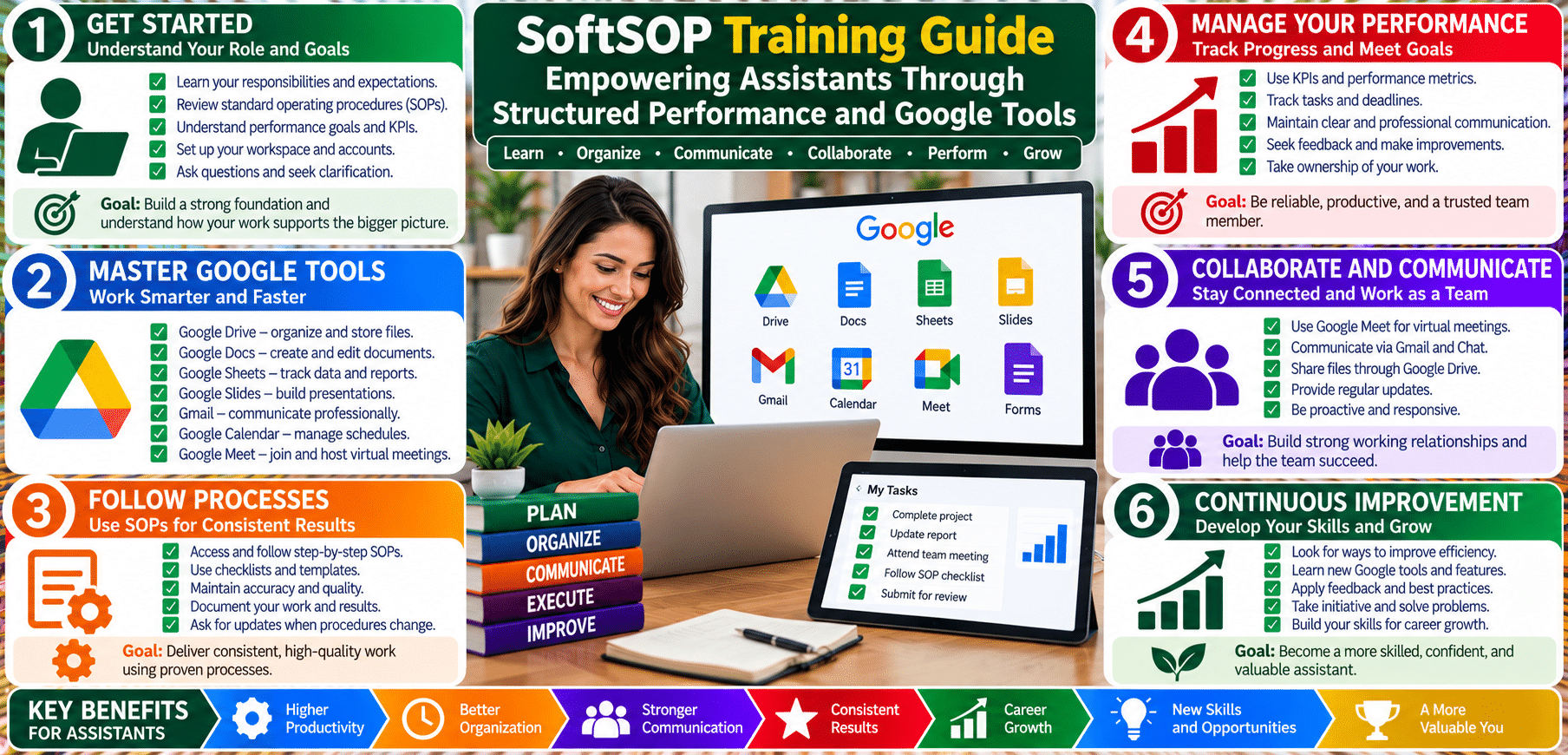
SoftSOP Training Guide: Empowering Assistants Through Structured Performance and Google Tools

© SoftSOP.com LLC – Training Division
In modern organizations, structured performance reviews and training systems are not just administrative tasks—they are critical instruments for liberty protection, accountability, and operational efficiency. Assistants are often the backbone of daily operations, managing sensitive data, coordinating teams, and supporting decision-making. Without structured performance review formats and training guides, their contributions risk being undervalued, overlooked, or mismanaged.
SoftSOP’s mission is to empower assistants and employees through clear Standard Operating Procedures (SOPs), measurable skill development, and the integration of technology tools like Google Workspace. By combining departmental review formats with digital literacy training, organizations protect employee freedom, ensure fair evaluations, and enhance operational security.
A departmental performance review format provides a framework for evaluation and development. Each department—whether Admin, IT, HR, Marketing, or Education—has distinct objectives, workflows, and skill requirements. A standardized format ensures fairness, transparency, and alignment with organizational goals.
Key elements of a departmental review SOP include:
By standardizing performance review formats per department, organizations protect the liberty of assistants. They ensure evaluations are based on measurable outcomes rather than subjective judgments, reducing bias and fostering a fair workplace culture.
Technology plays a crucial role in supporting structured training and performance reviews. Google Workspace for Education tools—such as Drive, Docs, Sheets, Forms, and Classroom—enable organizations to digitize workflows, improve collaboration, and maintain transparent records.
These tools empower assistants to document their work, collaborate across departments, and maintain accountability. Training programs that integrate Google tools teach employees how to manage data responsibly, ensuring both compliance and liberty protection.
At SoftSOP, technology literacy is not just about skill acquisition; it is a method to safeguard professional freedom. When assistants know how to organize, share, and secure their work digitally, they gain control over their contributions and protection against mismanagement.
Key teaching principles:
Teaching assistants to master these tools strengthens the organization’s digital ecosystem while ensuring employee autonomy, security, and accountability.
For practical implementation, SoftSOP provides a Do-It-Yourself (DIY) Skill Checklist, allowing assistants to track progress and supervisors to evaluate competence.
Example: Google Drive DIY Checklist
| Skill | Description | Help Link |
|---|---|---|
| Upload & Organize Files | Upload documents and organize folders | Google Drive Help |
| Share Files Securely | Set viewer, commenter, and editor permissions | Share files |
| Manage Shared Drives | Create and manage team drives | Shared drives |
| Version History | Track changes and restore files | Version history |
| Offline Access | Enable offline editing | Offline access |
| Integration with Docs/Sheets/Slides | Collaborative editing | Integration Help |
Teaching Tip: Encourage employees to complete each skill and mark progress. Supervisors can use this checklist during performance reviews to measure proficiency objectively.
The review template integrates the skill checklist with departmental objectives:
This approach ensures evaluations are structured, transparent, and evidence-based, reinforcing both employee protection and organizational efficiency.
A structured performance review system combined with Google Education tools enhances employee autonomy, safeguards liberty, and ensures organizational accountability. SoftSOP’s approach integrates training, SOPs, and technology to empower assistants and foster a fair, transparent, and secure work environment.
By following this guide, organizations can:
The SoftSOP framework proves that technology, structure, and education together create empowered, accountable, and secure teams.
© SoftSOP.com LLC – Training Division
Structured Training. Protected Liberty. Measurable Performance.