Procedure to Implement OSHA Worker Safety Using Microsoft Excel with Direct and Indirect Reporting Systems

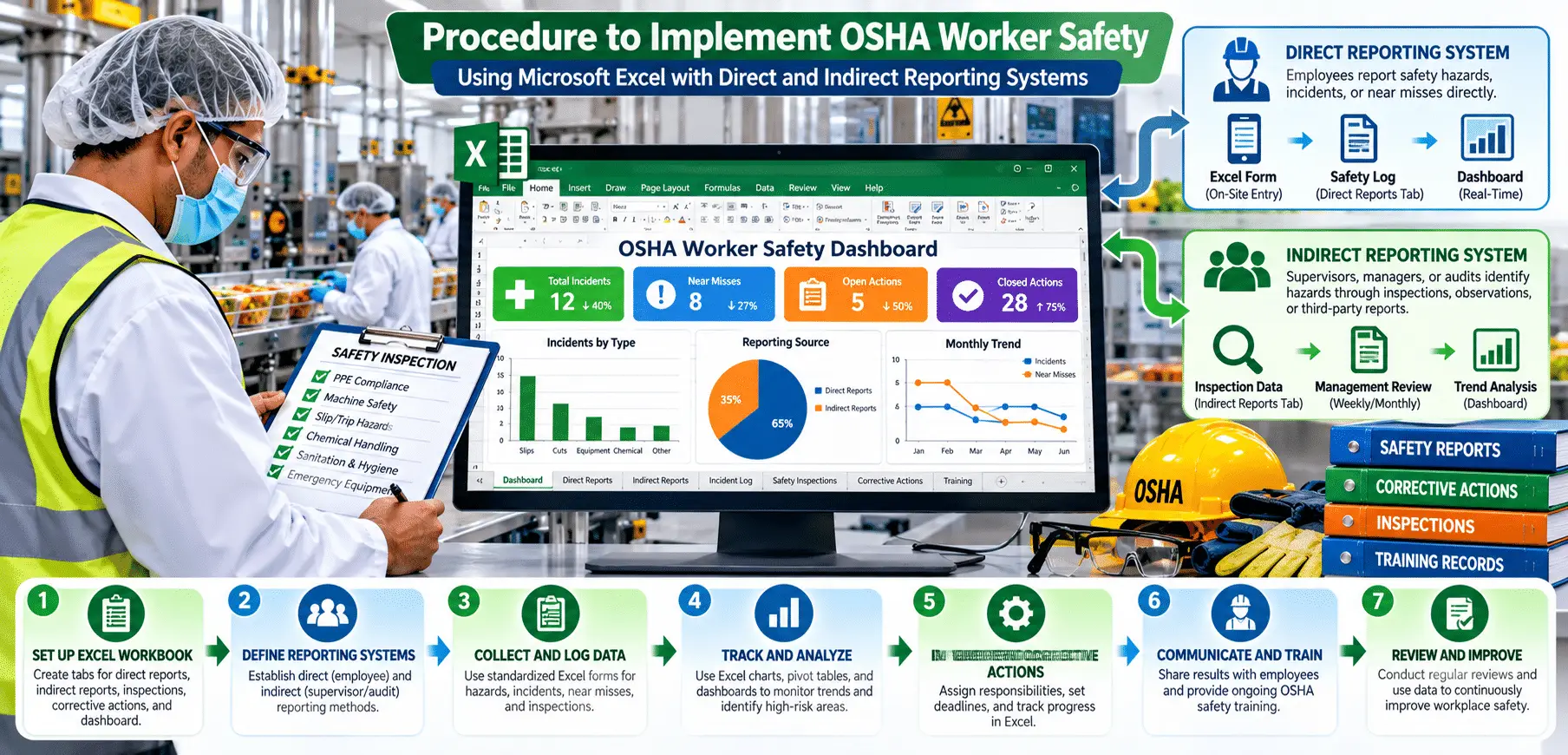

Ensuring worker safety is a critical responsibility for any organization. Beyond complying with OSHA regulations, a robust safety program protects employees, reduces accidents, and improves overall operational efficiency. Implementing a systematic procedure using Microsoft Excel allows organizations to track compliance, analyze data, and foster a culture of safety through both direct and indirect reporting systems.
The objective of this procedure is to improve OSHA worker safety compliance through structured reporting and tracking using Microsoft Excel. By leveraging this system, organizations can streamline work assignment cycle times, identify areas for improvement, and enhance productivity while maintaining a safe work environment.
The first step in implementing a safety compliance program is to establish a well-organized Excel workbook. This workbook will serve as the central hub for all safety-related data, allowing management to track employee compliance, training, incidents, inspections, feedback, and cycle times.
For clarity and ease of use, create the following sheets within the workbook:
By structuring the workbook into dedicated sheets, organizations can maintain organized records and simplify data analysis.
The Employee Data sheet provides a comprehensive record of employee-specific safety compliance metrics.
Maintain regular updates with employee information, training status, incidents, and inspection results. Accurate and timely data entry ensures reliable tracking and reporting.
The Training Records sheet records all safety training sessions for employees.
Record each training session along with the completion status. This data helps track skill gaps, ensure OSHA compliance, and schedule refresher sessions.
The Incident Reports sheet captures details of workplace incidents, helping organizations respond and prevent future occurrences.
Document every incident, including the type, severity, and corrective actions taken. This information supports risk analysis and regulatory reporting.
Safety inspections help identify hazards and assess compliance across departments.
Record findings and compliance status after each inspection. Ensure timely follow-up for non-compliant issues to maintain a safe work environment.
Employee feedback is essential to promoting a culture of safety.
Record feedback from employees and document actions taken. Incorporating employee input strengthens engagement and helps identify overlooked safety issues.
Tracking cycle times helps measure the operational impact of safety programs.
Compare cycle times before and after safety implementation.
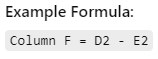
Analyzing differences helps demonstrate the efficiency gains associated with improved safety practices.
The Compliance Summary sheet aggregates all key metrics to provide a clear overview of safety compliance.
Summarize compliance data and operational metrics for before-and-after comparisons.
Use Excel formulas to calculate compliance rates and cycle times.
Example Formula for PPE Compliance Rate:=COUNTIF('Employee Data'!E:E, "Y") / COUNTA('Employee Data'!A:A)
This allows management to measure improvements and identify departments needing additional support.
Safety compliance relies on both direct and indirect reporting systems.
Evaluating safety program impact requires a structured comparison.
Collect baseline data, such as PPE compliance, training completion, incident rates, compliance status, and cycle times, from a defined period (e.g., Q1 2024).
Collect the same metrics after program implementation (e.g., Q3 2024).
Use the Compliance Summary Sheet to compare before-and-after results. Calculate improvement percentages and identify trends.
Create charts and graphs to visually represent improvements. Prepare a report summarizing the safety program’s impact and benefits.
Safety programs are most effective when continuously reviewed and refined.
Schedule monthly or quarterly reviews to assess program effectiveness. Update Excel sheets with new data and track ongoing compliance.
Incorporate employee feedback to enhance safety practices. Identify recurring hazards or issues and adjust policies accordingly.
Refine training, inspections, and reporting systems based on data insights. Continuous adaptation ensures the program evolves with organizational needs and regulatory updates.
By implementing OSHA worker safety procedures using Microsoft Excel, organizations gain a systematic approach to tracking compliance, reporting incidents, and improving overall workplace safety. Direct reporting methods, such as inspections and training, ensure immediate compliance, while indirect methods, such as feedback and culture promotion, reinforce a proactive safety mindset.
The before-and-after comparison highlights the tangible benefits of the program, including improved PPE compliance, reduced incident rates, and enhanced cycle times. Continuous monitoring and improvement foster a culture of safety, protect employees, and contribute to increased operational efficiency and productivity.
This structured approach demonstrates that safety compliance is not only a regulatory requirement but also a strategic initiative that directly impacts performance, employee well-being, and organizational success.
Disclaimer:
This procedure is provided for educational and operational guidance purposes only. Compliance with OSHA and local safety regulations remains the responsibility of the organization. Microsoft Excel serves as a tracking and analysis tool and does not replace required inspections, training, or regulatory compliance measures.